Writing Yarn Scripts
Before you can make games with Yarn, using game engines like Unity or Godot, you need to know how to write dialogue and interacticity using Yarn Script. Yarn Script is the langue used to write narratives using Yarn Spinner.
Using Try Yarn Spinner
When you first start learning, the best tool to work with is Try Yarn Spinner, so fire up your web browser—no installation necessary:
Visit Try Yarn Spinner
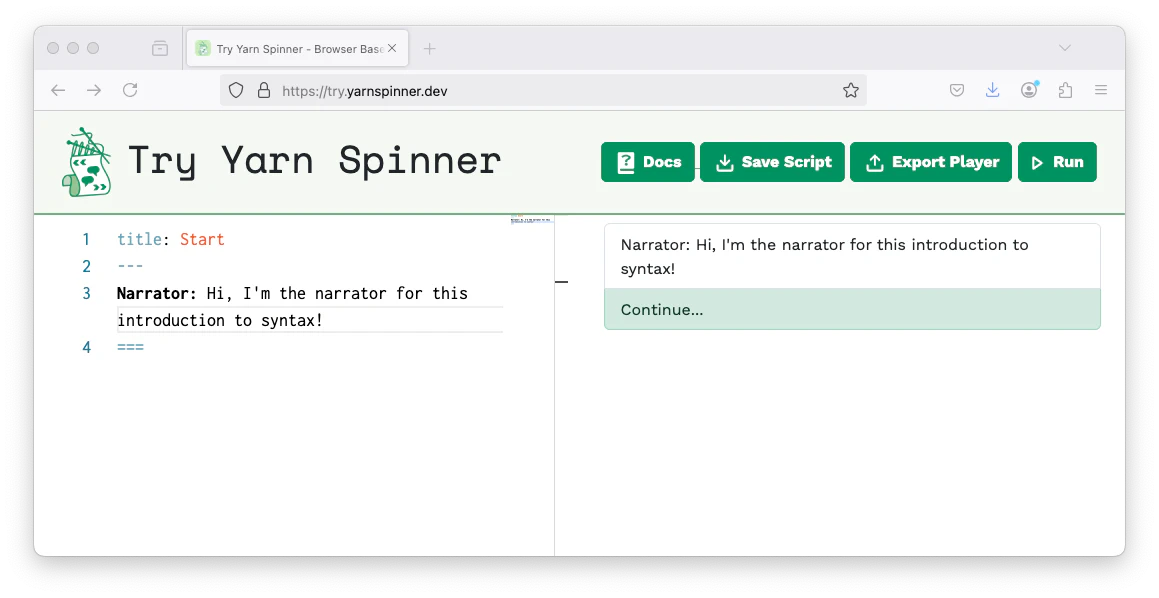
In Try Yarn Spinner, the first node to run is always called Start, so we’ll write that now:
title: Start
---
Narrator: Hi, I'm the narrator for this beginner's guide!
===
Copy and paste, or write, the above Yarn script into Try Yarn Spinner!
The title of a node is important, because your game uses node titles to tell Yarn Spinner which node to start running. You also use the title of a node when you want to jump to another node.
The part of the node above the --- is called the node header. Node headers can actually contain any number of lines with the structure key: value. This can be used to store additional information, such as the in-game location the conversation is taking place.
The only required key in a node header is the title. A nodes title is not shown to a player, and must start with a letter, can contain any letters, numbers and underscores, but cannot contain a period or other symbols.
Running Dialogue in Try Yarn Spinner
Once you’ve copied and pasted the above Yarn Script, or something very similar, into Try Yarn Spinner and click the Test button, you’ll see the dialogue appear in the right side of the screen.
In Yarn, everything you write is text. Yarn files are just plain text files with a .yarn extension. Everything inside a Yarn file is structured around nodes and lines.
Next, learn the basics of nodes and branching.